Built and operated by the studio

Cumpără cu AI: a shopping assistant connected to a multi-network catalogue

A Romanian shopping site whose main interaction is a conversation with an AI assistant, next to a catalogue of products from partner shops. The assistant asks what the visitor needs, narrows the catalogue and recommends; the visitor buys at the shop through an affiliate link. We designed, built and operate it.

The project in one minute

Categories, brand and price filters, a real AI assistant answer, a side-by-side comparison and price history, in one minute.

Read the transcript

All project videos, with transcripts

1:12English narration and subtitles

Live site recording; the assistant segment is an earlier real session, labelled on screen. Waits trimmed. Synthetic English voice (Microsoft Edge TTS), English subtitles in the picture.

  • 3affiliate networks integrated: 2Performant, Awin, Profitshare
  • 500k+shop listings recorded on the first night of price history
  • 290real searches checked on every deploy
  • 17departments over thousands of supplier categories

The principle: the model does language, the code does facts

The assistant acts only through tools that read the local catalogue, and its rules allow it to name only products those tools returned. Prices are written by the application, not by the model, and it writes no URLs: the page shows the product cards. Missing specifications are stated as “unknown”, never “absent”. It is told never to say anything negative about a product, brand or shop, and answers are checked before they are shown, so one that breaks a rule is rewritten. A language model can still make mistakes; these controls keep them rare, visible and correctable.

Designed for phones as much as for desktops

Below 1024 pixels the catalogue and the assistant become two tabs, “Produse” and “Asistent AI”; above, the assistant is a column on the right that can be folded away. Filters, menus and the comparison adapt to each size, and nothing scrolls sideways at 320 pixels.
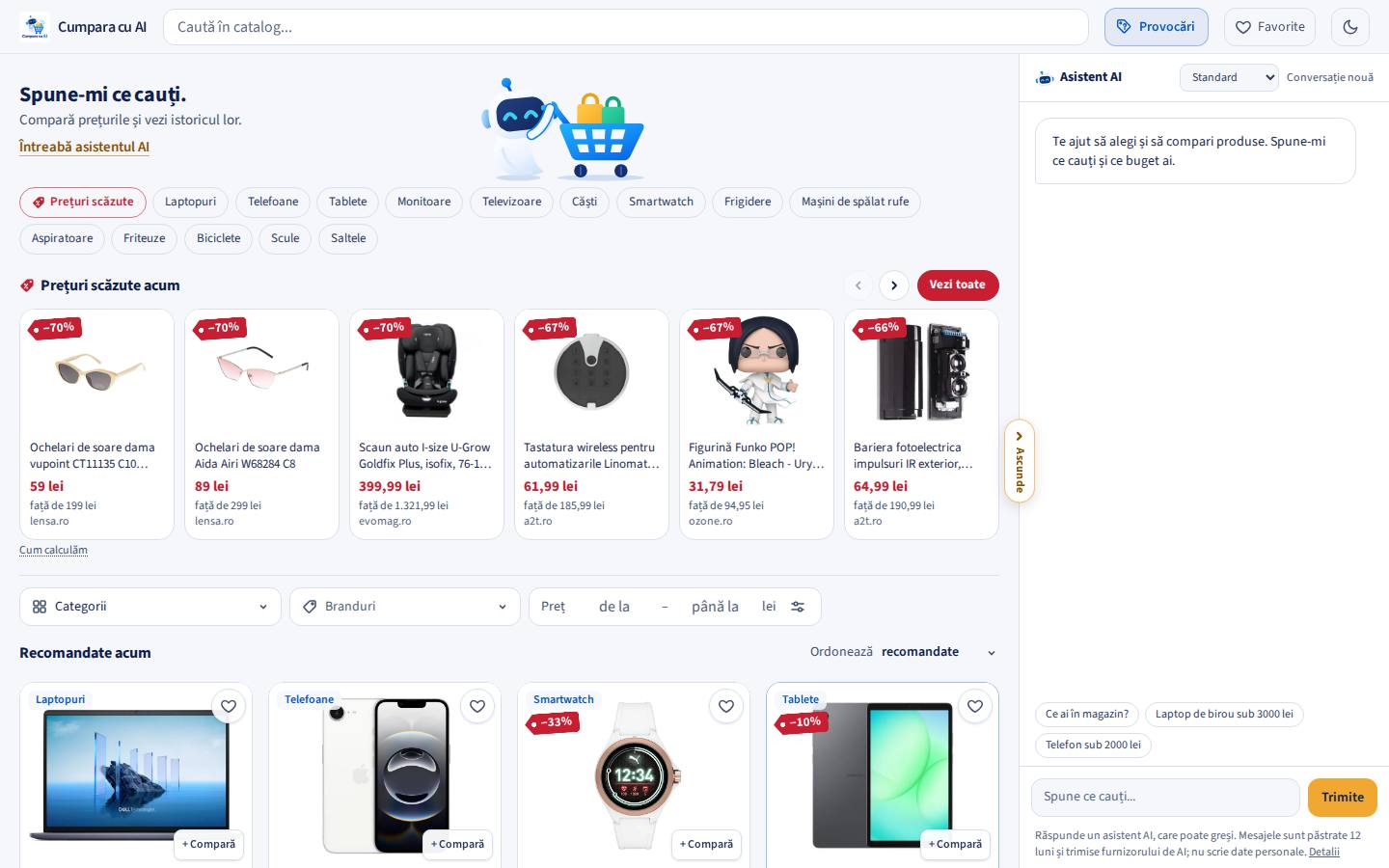
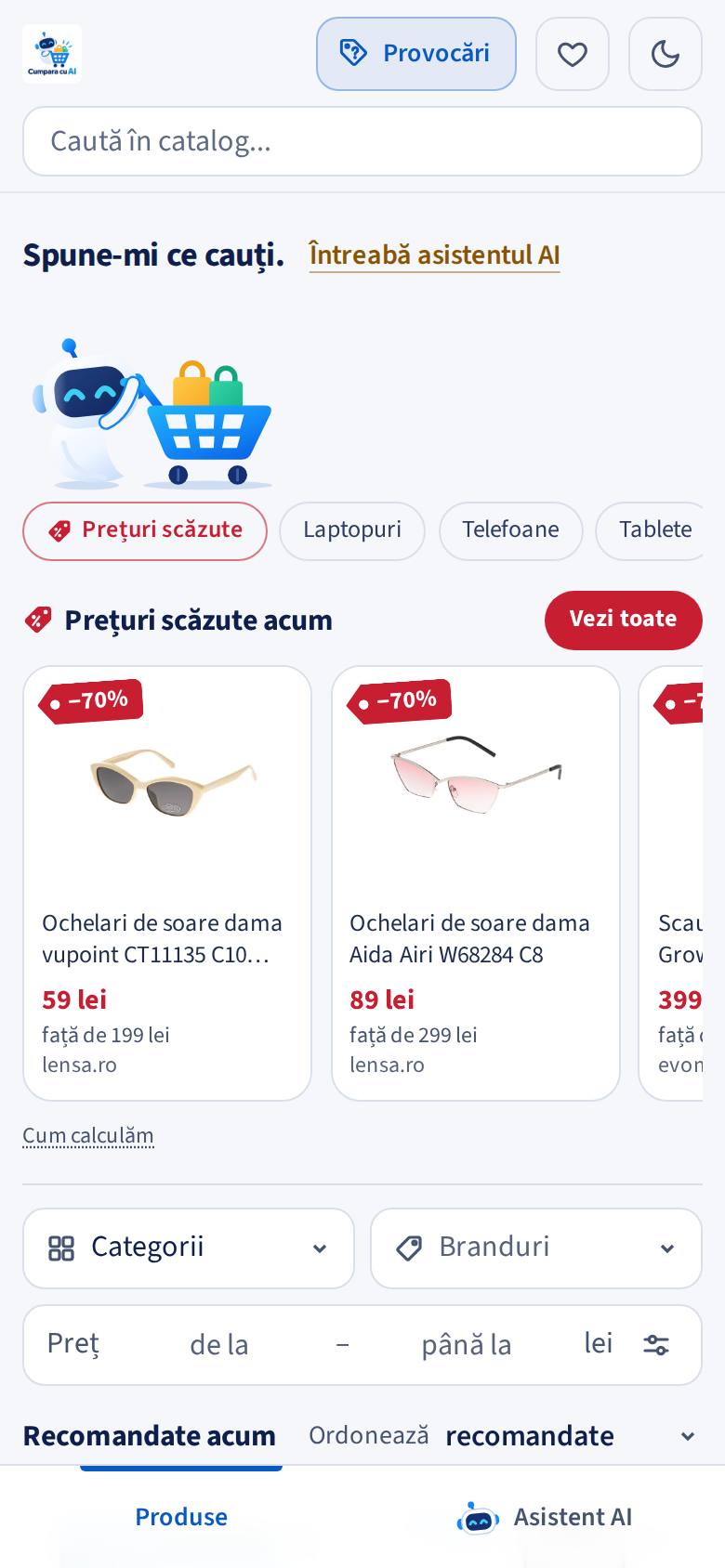
Desktop
Cumpără cu AI on a desktop screen: catalogue with price drops and category filters on the left, the AI assistant column on the right.
Phone
Cumpără cu AI on a phone: search, top categories and price drops, with Products and AI Assistant tabs at the bottom.
The same catalogue on a 1440-pixel desktop and a 390-pixel phone.

How the AI assistant works

  1. The visitor writesWith each message the page sends what it currently shows: filters, the first products, the total.
  2. Guardrails firstGreetings, off-topic questions and junk get a free reply with no model call. Limits per visitor and a daily site-wide cost cap apply.
  3. The model chooses a toolFilter the catalogue, recommend, show details, compare, or ask one clarifying question.
  4. The code answers with factsSearches run on the local catalogue; budgets and measurable specs become real filters.
  5. Page and chat stay in syncThe filters appear as the same chips a visitor would set; a visitor’s own change wins.

A general request (“a laptop”, “phones under 2,000 lei”) narrows the catalogue and asks at most two useful questions. A specific one returns a few picks, each with a reason from the data. “16 GB RAM” becomes a filter for at least 16 GB, and the assistant says that only products stating it are shown. Follow-ups keep the product and budget unless the visitor clearly moves on.

The live assistant runs on an inexpensive Gemini model with a backup in the configured order. The configuration panel lists the models, each with a test button, and stores keys encrypted.
Watch the assistant demonstration

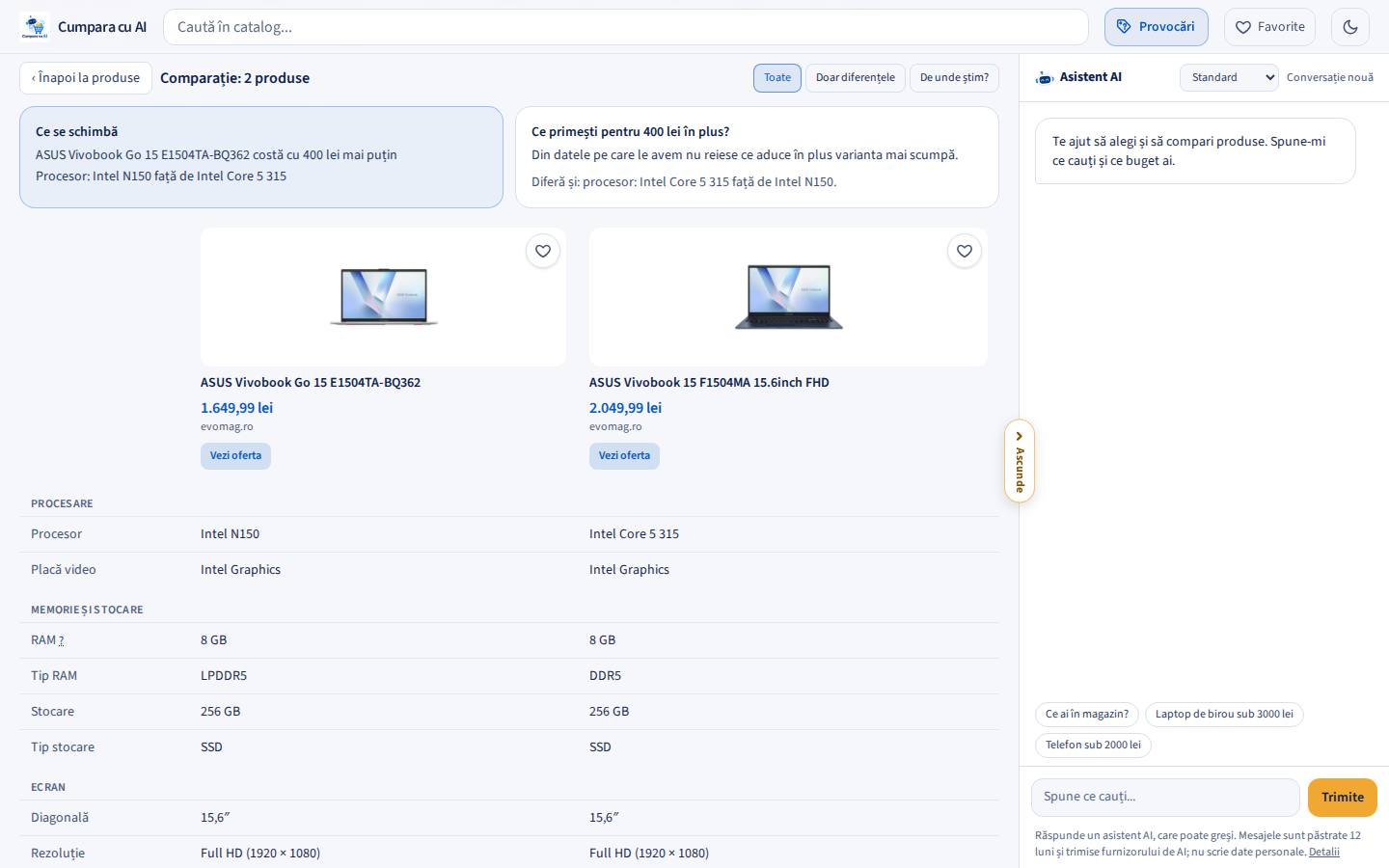
Two laptops compared side by side: what changes, what the extra price buys, and grouped specification rows.
A comparison opens in the catalogue’s place: what changes, what the extra price buys, grouped rows and the source of every value.

From affiliate feeds to a catalogue

  1. DownloadNightly from 03:30, within a time budget, for each network switched on: 2Performant “My feeds” files, the Profitshare export, Awin feeds.
  2. NormaliseTitles, brands, barcodes, category paths and prices into products and offers.
  3. MatchThe same product from several shops shown once, at the best eligible price, with “+N shops”.
  4. ClassifyNew categories placed into 17 departments by an AI job, with manual overrides respected.
  5. ServeOnly offers confirmed within three days, in stock, from enabled shops, are shown.

Each network has its own adapter behind one interface. 2Performant catalogues come only from its authorised feed files, and a guard in the code refuses any other address on that network, even on a redirect. A growth guard holds back a shop that suddenly sends far more new products than usual, and a new shop stays out of search until the search-quality check passes with it. Every outbound link goes through one redirect that adds the affiliate code and checks the offer can still be bought.

Feeds or APIs? What we learned

Observed price history and honest price drops

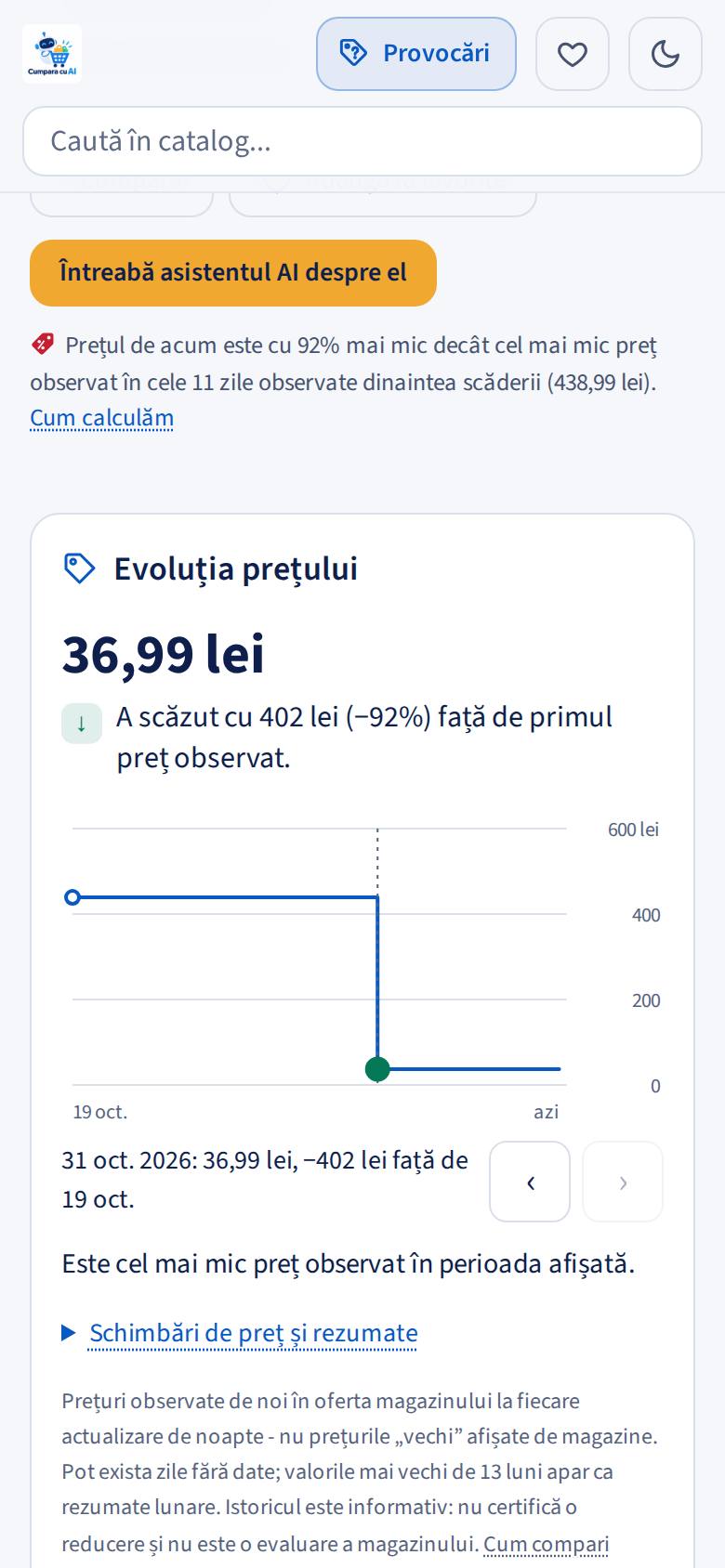
Each nightly import records a listing’s price at the start, at each change and when it returns after a gap. Old points fold into monthly and yearly summaries. The product page says what the prices did in the period shown, with a step chart and the full table in the HTML.

A price drop compares today’s price with the lowest price observed in the 30 days before the fall, never with a shop’s “old price”, and needs at least 8 days observed. Drops feed a dedicated section, red tags and a front-page row.
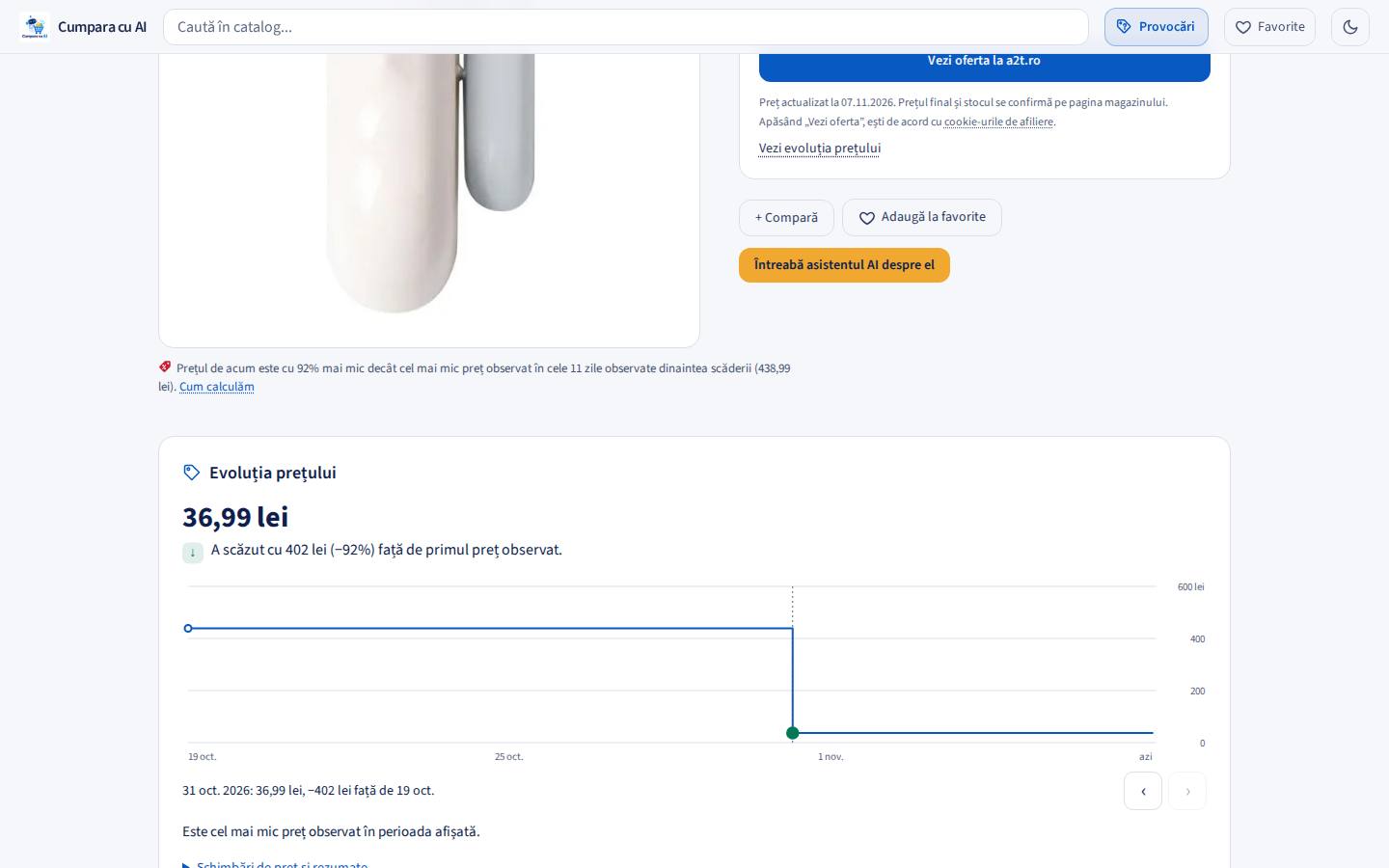
Desktop
Observed price history of a product: a step chart, the change in lei and percent, and where today’s price stands.
Phone
The price history chart on a phone.
Price history on a desktop product page and on a phone.

Search ranks what a product is before what it is made for, so a tablet comes before its cases. A number and its unit are one requirement. When no product holds every word, the words that give way are chosen by evidence and the page says which ones. A curated list maps everyday words and synonyms to departments.

A suite of 290 typical searches runs against the live catalogue on every deploy and after every nightly import; a case that passed and now fails rolls the deploy back.
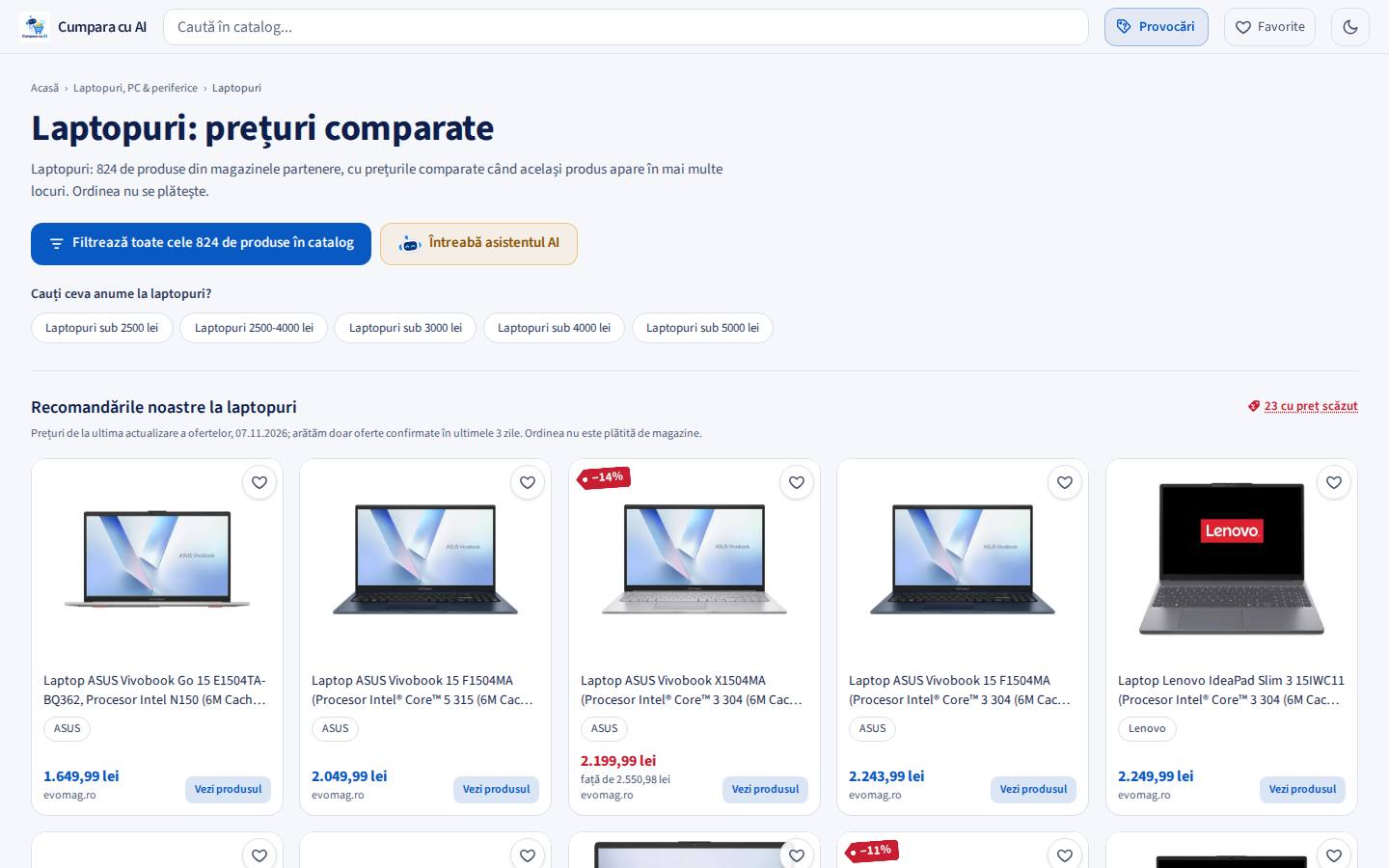
A category page for laptops, laid out like the catalogue, with the real product count in the heading.

Operations behind the scenes

  • Pictures are fetched by our own proxy, shrunk to WebP and cached on disk, so repeat views are served from our own server and shops never see our visitors.
  • Administration: networks, shops and categories on and off, AI models and keys, import progress, conversations, costs and search problems found in real conversations.
  • Statistics without cookies: daily totals, page views confirmed by the browser, robots counted by name, and robot clicks to shops kept apart from people’s.
  • Safety nets: nightly backups with an integrity check, deploys gated by the search suite with automatic rollback, and a written, numbered brief of every rule the site follows.
  • Legal pages and disclosure: affiliate links marked as such, a privacy policy describing actual data flows, no third-party analytics.

See it in use

Recorded on the live site. The Romanian interface is the real product; English subtitles are available in the player.

Cumpără cu AI on desktop: filters, the AI assistant, comparison and price history

1:05 · The video loads only when you press play.

Recorded on the live site at 1440×900. Real AI reply; waiting and typing shortened. Romanian interface with burned-in Romanian captions and an AI-synthesised Romanian voice; English subtitles available.

Read the transcript
  1. Don't choose on price alone. See how you search, compare and check.
  2. Start with a category. Quickly find what interests you.
  3. Start with a category. One click and you see the matching products.
  4. Pick your preferred brands. You can select several.
  5. Two brands. One selection. Lenovo and ASUS in the same search.
  6. The budget stays yours. Use the price slider.
  7. The budget stays yours. Or type the exact amount.
  8. Ask the AI assistant. Tell it what you will use the product for.
  9. You get an answer in context. It already knows the filters. Waiting shortened.
  10. You get an answer in context. A real reply, with the differences explained.
  11. Compare two models. Pick them straight from the catalogue.
  12. See only the differences. Price, RAM, processor and the other specifications.
  13. Keep them in favourites. Saved in the browser, no account.
  14. Open the product page. Details and specifications in one place.
  15. Search by model, too. Another example: a Hikvision camera.
  16. Check the observed history. Example: Hikvision camera. Real data.
  17. See the recorded data. Dated observations, not just a displayed price.
  18. The same product, several offers. Example: Xiaomi Redmi Watch 6.
  19. Compare the available offers. Choose the shop after you check.
  20. Try it yourself: cumparacuai.ro. Search. Compare. Choose.

Cumpără cu AI on a phone: asking the AI assistant, then refining by hand

1:07 · The video loads only when you press play.

Recorded on the live site in a 390×844 touch browser. Real AI reply; waiting shortened. Romanian interface and captions, AI-synthesised voice; English subtitles available.

Read the transcript
  1. You have a budget. What do you choose? The mobile version, step by step.
  2. Tell the AI what you are looking for. Preferences, use and budget.
  3. You get explanations, not just a list. A real reply. Waiting shortened.
  4. See the suggested models. You decide what to check next.
  5. The products are one tab away. Go straight back to the catalogue.
  6. You can also refine by hand. Open the Categories menu.
  7. Find the category quickly. Search by name.
  8. Choose what you want to explore. Phones, in a single tap.
  9. Select several brands. Brands relevant to the category.
  10. Samsung and Xiaomi together. A single product selection.
  11. Adjust the price range. The slider works on mobile too.
  12. Or type the exact budget. You stay in control of the filters.
  13. Compare before you choose. Select two products.
  14. Focus on the differences. RAM, storage, screen and price.
  15. Check both models. The comparison scrolls sideways.
  16. Save it for later. Favourites in the browser, no account.
  17. Open the product page. Photos, price and specifications.
  18. Search for an exact model too. Another example: a Hikvision camera.
  19. Check the observed history. Hikvision example: dated observations.
  20. The same product, several offers. Example: Xiaomi Redmi Watch 6.
  21. See the available offers. Choose the shop after you check.
  22. Try it yourself: cumparacuai.ro. Search. Compare. Choose.

Cumpără cu AI: price games built on the real catalogue

0:34 · The video loads only when you press play.

Real phone captures of the live games; generated beat, no third-party music.

Read the transcript
  1. How much does this watch cost? Write your guess in the comments.
  2. We said 900 lei. Did you guess better? The answer comes at the end.
  3. Shopping challenges: short games with real catalogue prices.
  4. Daily challenge: the same 5 rounds for everyone, different every day.
  5. Which costs more? Left or right? Choose in 3 seconds.
  6. Right: 2,776.99 lei. 409 lei more than the left.
  7. Budget challenge: keyboard + mouse + headphones in 1,000 lei. Can you do it?
  8. Pick one at a time and always see how much budget is left.
  9. Complete list within budget: 737.97 lei of 1,000 lei.
  10. And the watch? The real price: 499.99 lei.
  11. What’s your score? cumparacuai.ro/provocari
  12. (No voice; generated beat, no third-party music.)

Price games

Short games on real catalogue products (guess the price, which costs more, a budget challenge) bring visitors back and make price history tangible. Prices are sealed when a round starts and nothing is stored about the player.

Technology used

  • Python 3.12
  • FastAPI
  • Uvicorn
  • Pydantic
  • SQLAlchemy
  • SQLite (WAL)
  • Jinja2
  • JavaScript
  • Tailwind CSS
  • Server-Sent Events
  • Gemini API
  • Gemini Batch API
  • Claude (initial classification)
  • HTTPX
  • Pillow / WebP
  • ALTCHA
  • Docker Compose
  • Caddy
  • systemd timers
  • Hostinger VPS
  • pytest
  • Playwright

All technologies

What this case study does not claim

Cumpără cu AI is an affiliate platform: purchases happen at partner shops, so we do not show checkout or payment work here. We do not publish traffic or revenue figures, and the numbers above are measurements, not growth claims.

Services this project demonstrates

Build a platform like this

A catalogue from your feeds, an assistant grounded in your data, price history and the operations to run it.

Discuss your project