Built and operated by the studio

Facebook ads automation: from a product link to a checked Meta campaign

We built a tool that turns one product link into a complete Facebook and Instagram traffic campaign: it reads the product and its offers, checks them against written rules, draws the ad picture and video, writes the texts, sets the audience and creates the campaign through the Meta Marketing API, paused, for a person to approve.

The project in one minute

Offer checks, the generated creative, budget and dates, audience and a final preview, in the real tool running in trial mode.

Read the transcript

All project videos, with transcripts

1:14English narration and subtitles

The real local tool in trial mode, with one real product snapshot. Nothing was published; tracking codes redacted. Synthetic English voice (Microsoft Edge TTS), English subtitles in the picture.

  • 1 linkis all it needs to prepare a whole campaign
  • 5 requeststo Meta for a picture ad, once targeting ids are cached; a video ad adds an upload and a few status checks
  • 1080×1350picture and video ad, plus a 1080×1920 vertical cut
  • 3 a daylive runs at most, a local brake on top of Meta’s limits

What the tool does, in short

You paste a product address from Raftul copiilor or Cumpără cu AI. The tool reads the product, every shop’s offer and the observed price history straight from the site’s database, read-only. It picks the offer worth advertising, scores it against the owner’s guidelines for a profitable product ad, and opens a single confirm page with everything Meta would receive: picture, video, texts, budget, dates, audience and link.

Nothing reaches Meta until Create campaign is pressed. A trial mode shows exactly what would be sent and sends nothing. After launch, the tool keeps checking that the advertised offer is still true, at the advertised price, and says so when it is not.
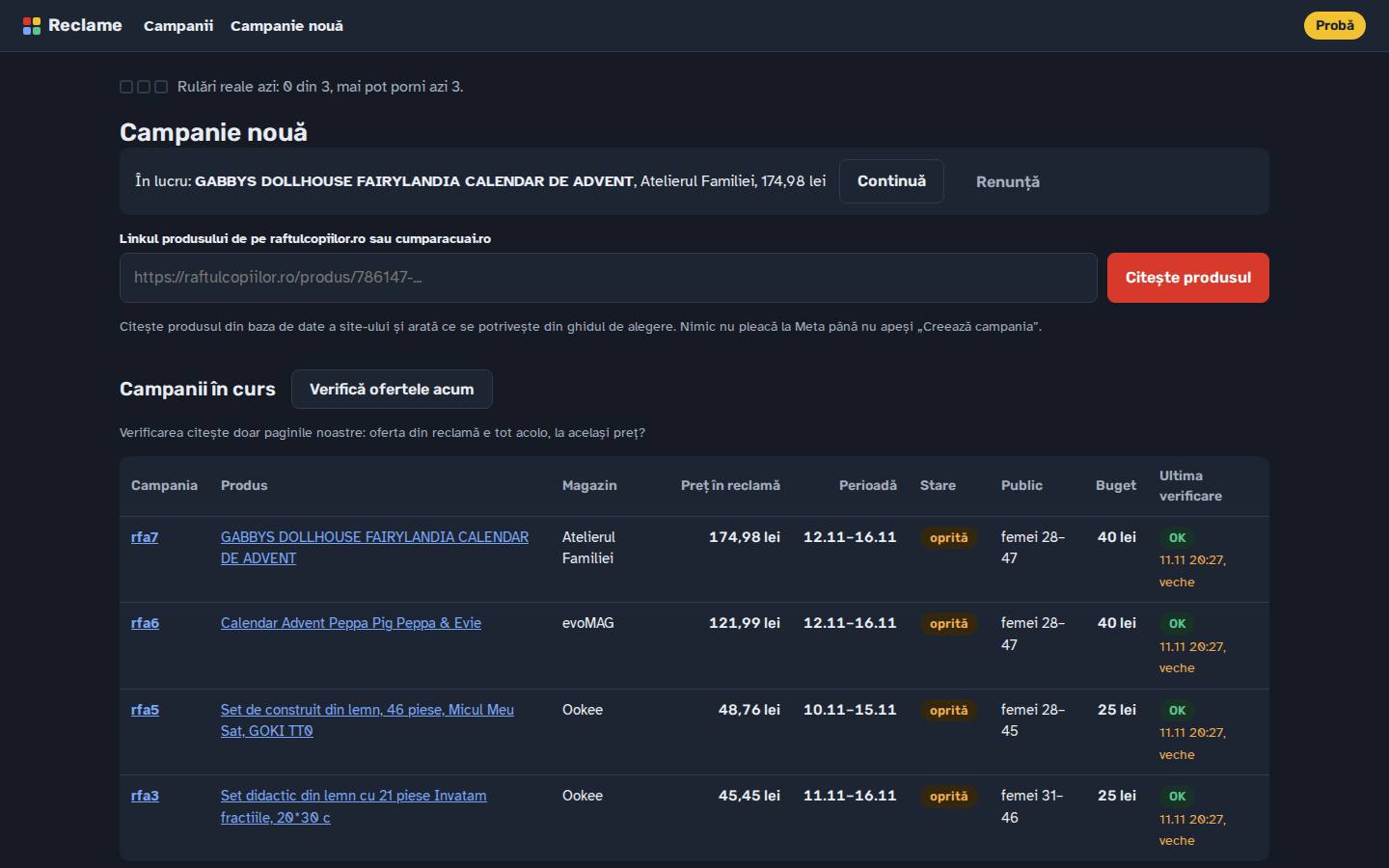
The Facebook ads panel: a field for a product link, today’s live runs out of three, and the running campaigns with product, shop, advertised price, dates, status, audience, budget and the last offer check.
The panel’s home: a field for a new product link, today’s live runs out of three, and campaigns in progress with their last offer check. Trial mode is marked in the corner.

How one campaign is made

  1. Paste a linkA product page from either site. The product, its offers and its price drop are read from the database over SSH, read-only.
  2. Pick the offerThe largest real fall among the shops that allow Facebook ads, else the cheapest. Stale, out-of-stock or dead-link offers are refused.
  3. Check the productA tick or a warning for each written rule: price band, discount, child’s age, photo, restricted words, promotion end, recent campaigns.
  4. Draw and writeThe picture and, when a storyboard exists, the video; the primary text, headline and display link, with the affiliate disclosure.
  5. Set the audienceAges, parent groups and cities derived from the child’s age the shop states, every value editable.
  6. Create, pausedCampaign, ad set, upload, creative and ad through the Marketing API. On any refusal, what was made in that run is deleted.
  7. Watch the offerThe advertised offer is checked against the site every two hours; a change is reported, never acted on silently.
The Facebook ads panel: a field for a product link, today’s live runs out of three, and the running campaigns with product, shop, advertised price, dates, status, audience, budget and the last offer check.
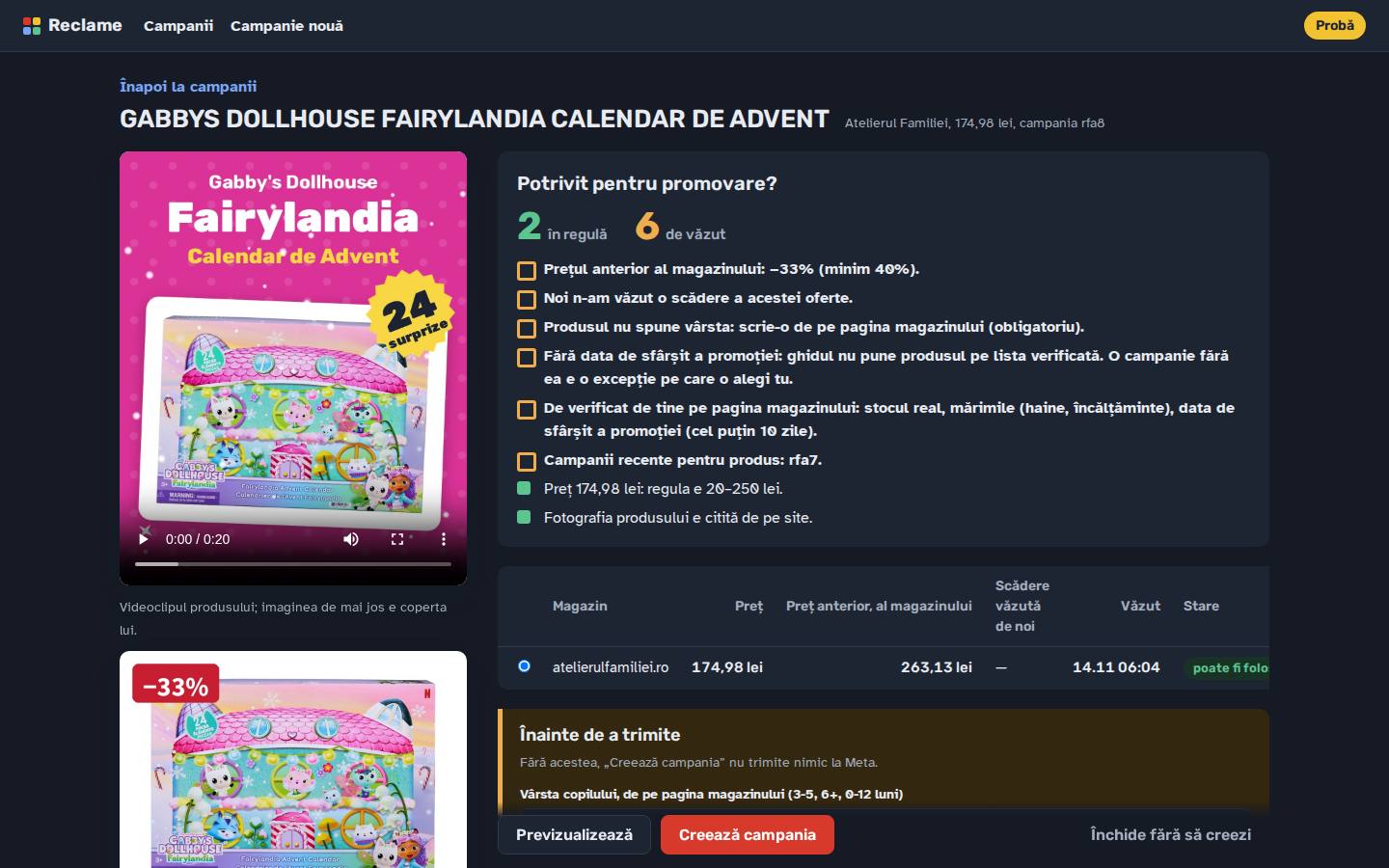
The confirm page for a new Facebook ad: the product video and picture on the left; on the right the “worth promoting?” tally, two rules met and six to look at, and the shop’s offer with its own previous price.
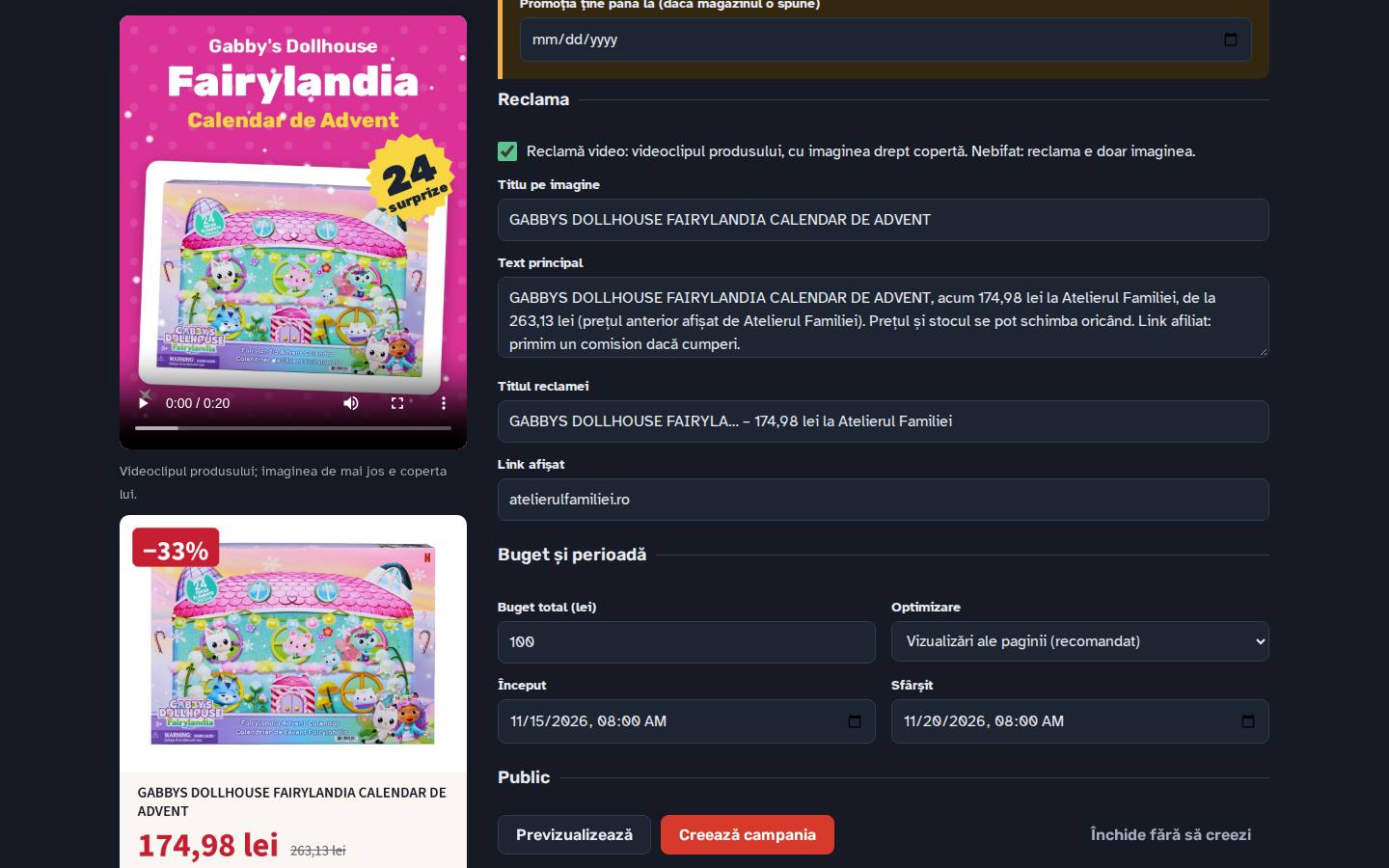
The ad section of the confirm page: video ad switch, the title on the picture, the primary text with the affiliate disclosure, the headline, the display link, then budget, optimisation and dates.
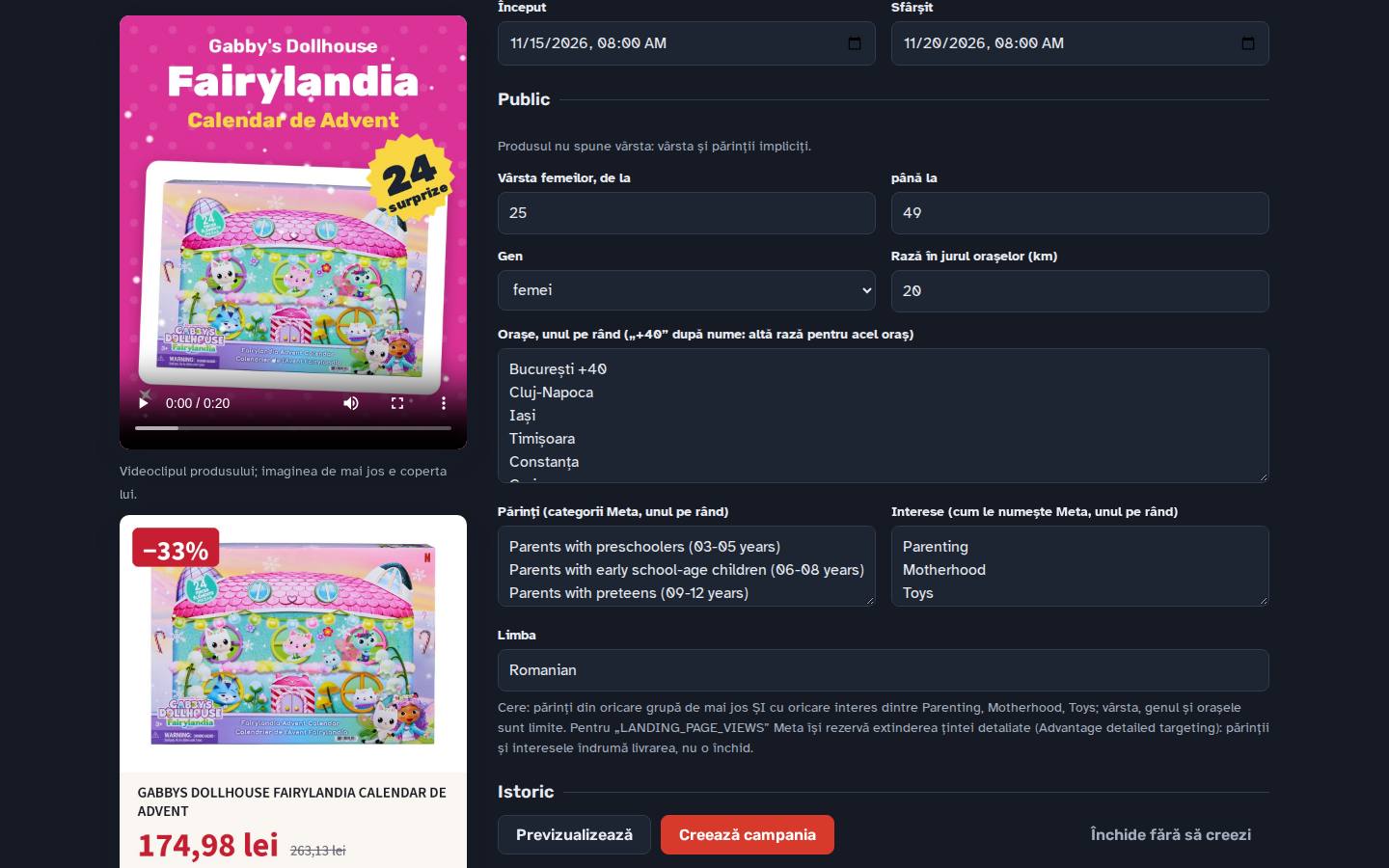
The audience section: women’s age range, gender, radius, cities with their own radius, Meta parent groups by the child’s age, interests and language, with a plain sentence saying how Meta will combine them.
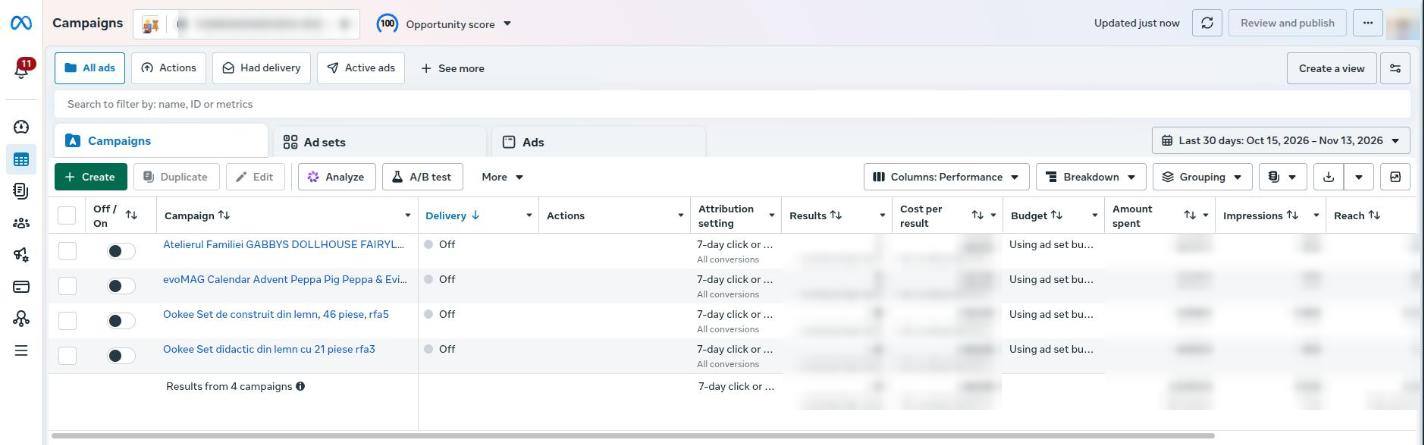
Meta Ads Manager listing the four campaigns the tool created, each named after the shop, the product and its campaign number (rfa3 to rfa7), all switched off; the account ID and every spend and result figure are blurred.
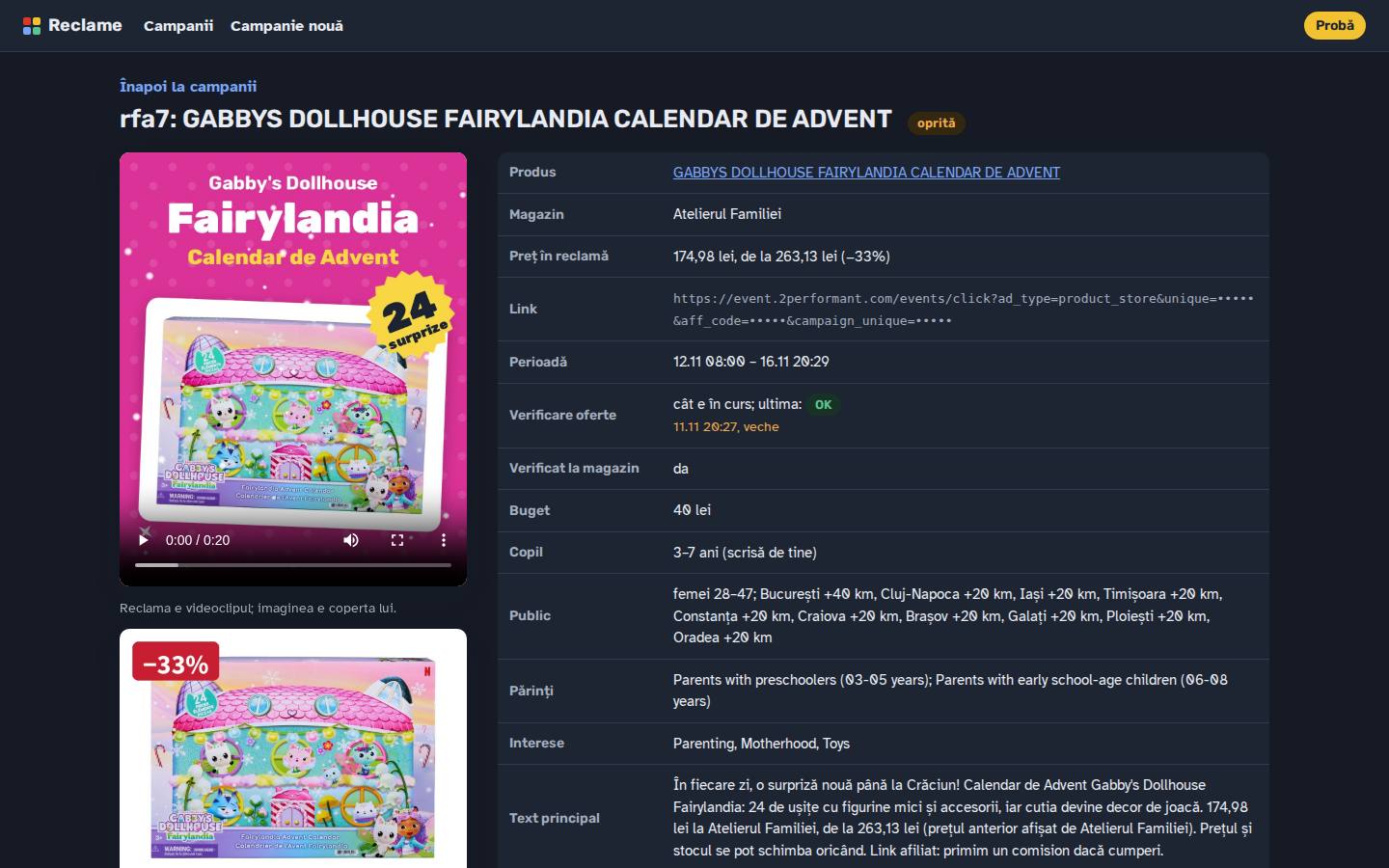
A campaign’s page after creation: status, product, shop, advertised price against the shop’s previous price, the tracked link (affiliate code masked here), dates, offer check, budget, audience and the ad text.

One confirm page, every decision visible

The confirm page opens with a plain question: is this product worth promoting? Each rule from the owner’s written guidelines that the data can answer gets a tick or a warning: a price between 20 and 250 lei (under about 150 lei an ad rarely pays for itself from the commission), a fall of at least 40% against the shop’s previous price and against what we observed, the child’s age, a usable photo, words Meta restricts, a promotion ending at least 10 days away, and any campaign already run for the same product.

Warnings inform, they do not block: the person decides. What may not be advertised at all, such as a shop whose affiliate programme declines Facebook ads, is refused before the page opens. A live run also requires the child’s age from the shop’s page and a ticked “I checked the shop’s page”: stock, sizes and the promotion’s end.

The confirm page for a new Facebook ad: the product video and picture on the left; on the right the “worth promoting?” tally, two rules met and six to look at, and the shop’s offer with its own previous price.
The confirm page in trial mode: the ad’s video and its cover picture, the verdict (two rules met, six to look at) and the shop’s offer with its own previous price.

Ad pictures drawn from facts, not guesses

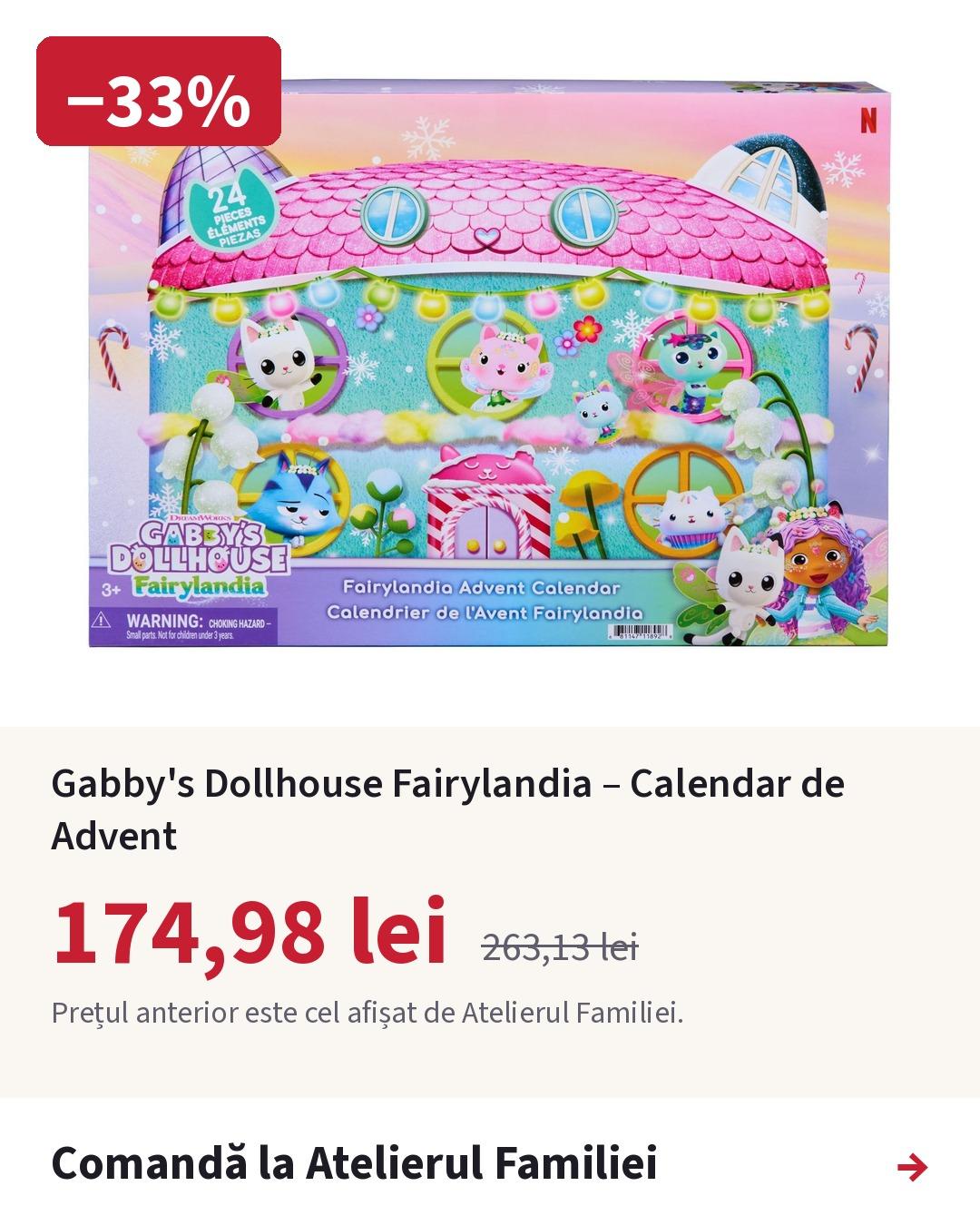
Every ad picture is drawn by code at 1080×1350, Meta’s tallest feed shape, from the shop’s own product photo and the offer as it reads at that moment. The crossed-out price is always the shop’s own previous price from its feed, never one we estimated, and the picture says whose it is. The percentage is rounded down. With no previous price from the shop, the ad shows the price alone.

Every text carries “Affiliate link: we earn a commission if you buy” and “Price and stock can change at any time.” Meta’s creative enhancements and multi-advertiser ads are switched off, so the price is never cropped and the claim never rewritten; Audience Network and Messenger placements are left out to avoid accidental clicks.
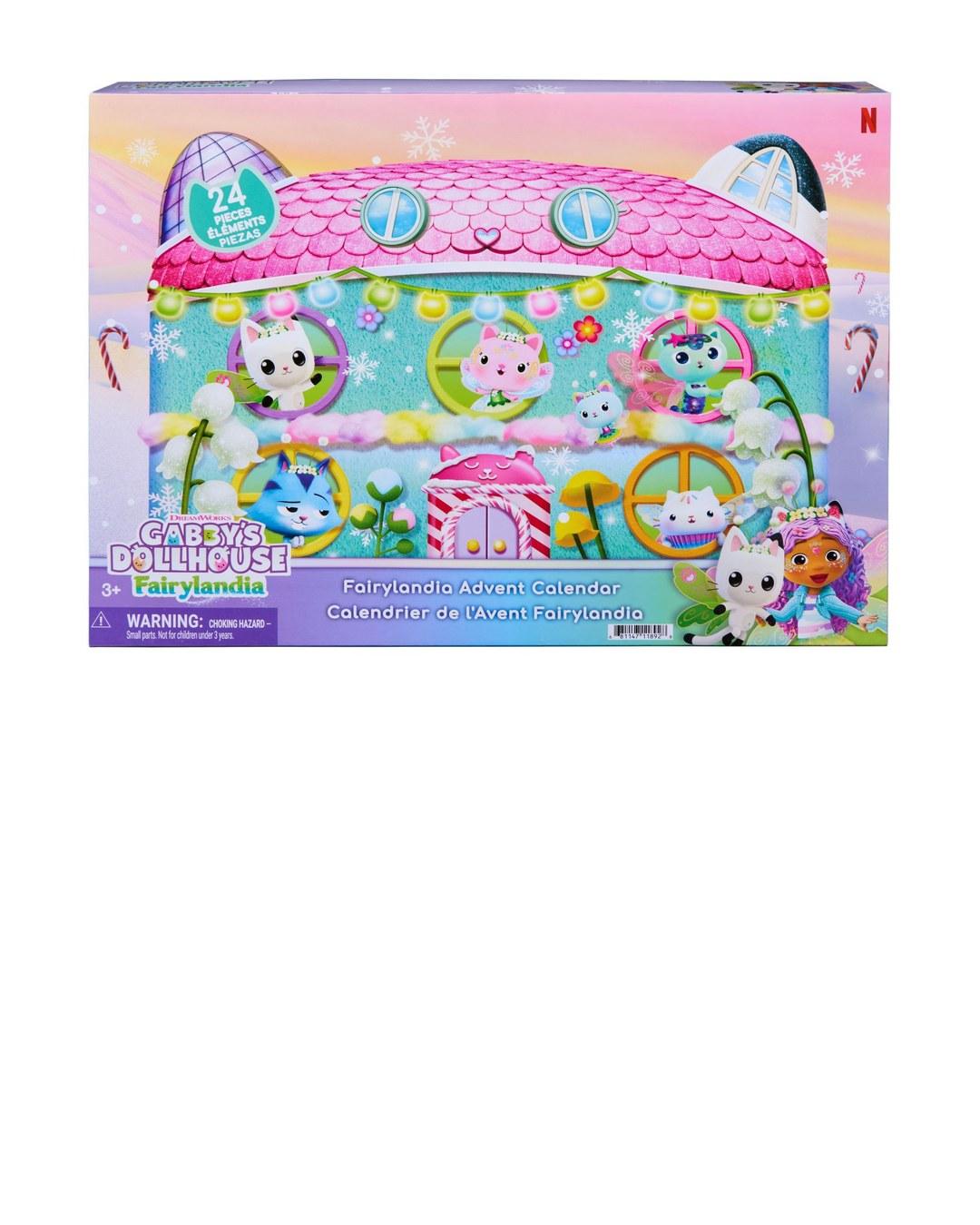
The shop’s photo of the Gabby’s Dollhouse advent calendar alone, placed where the ad tool places it, before anything is drawn on it.
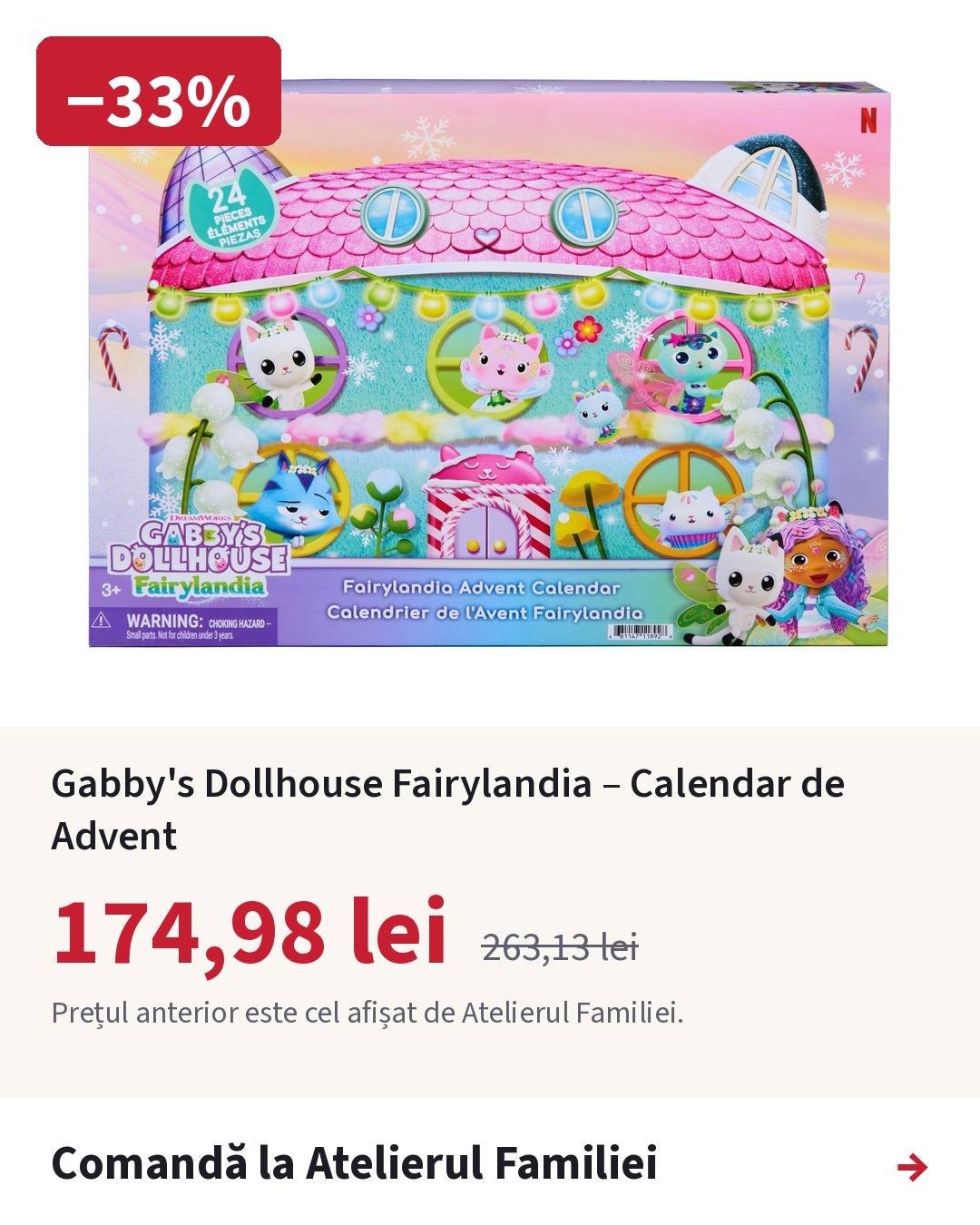
A Facebook ad picture for an advent calendar: −33%, 174.98 lei against Atelierul Familiei’s previous price of 263.13 lei, and “Order at Atelierul Familiei”.
Drag the divider: on the left the shop’s photo as the tool receives it, on the right the ad it drew for campaign rfa7. The badge, title, price, the shop’s previous price with its source and the order bar are added from the offer’s data.
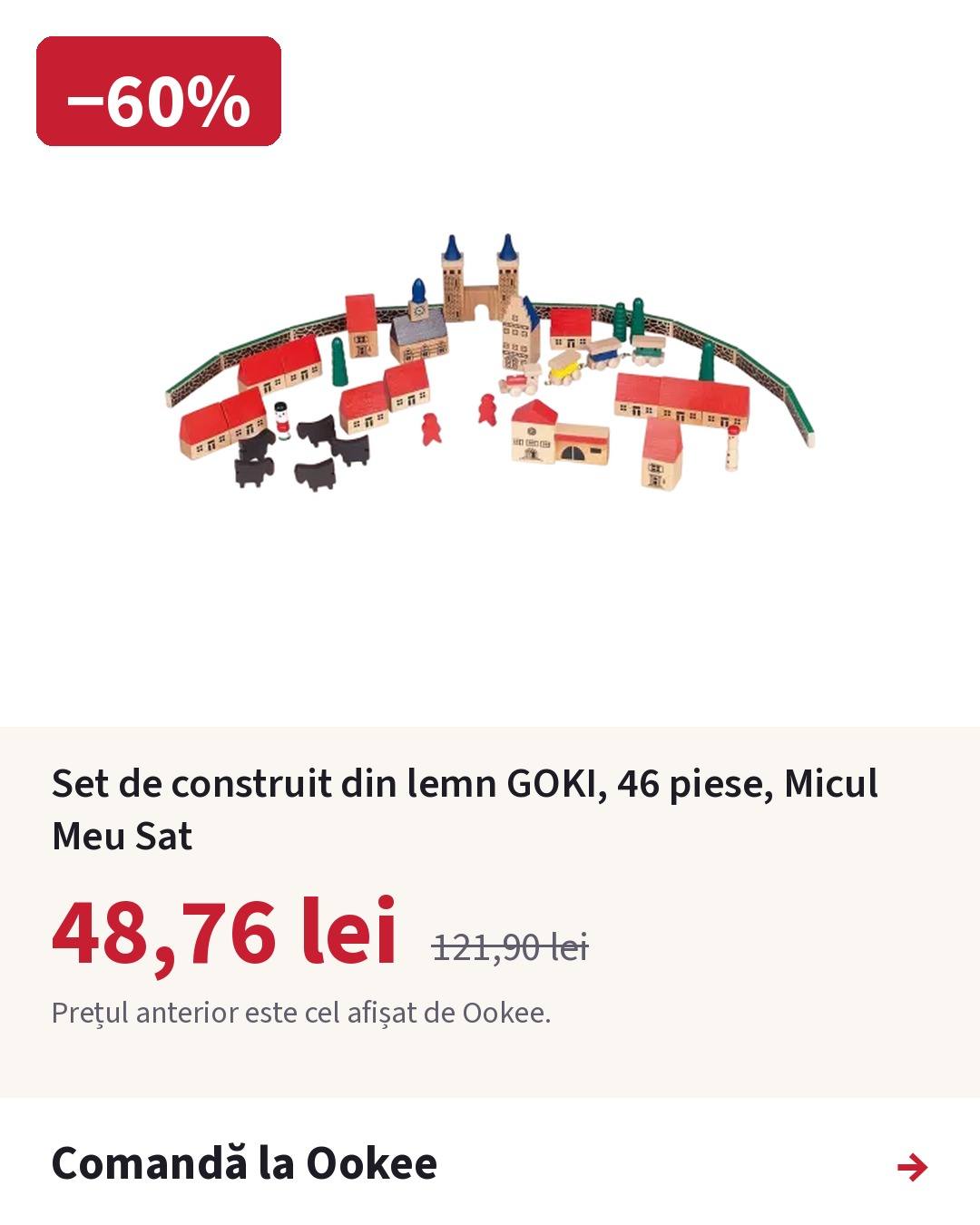
A Facebook ad picture drawn by the tool: a wooden building set, −60%, 48.76 lei against Ookee’s previous price of 121.90 lei, with the source of the previous price and an order button.
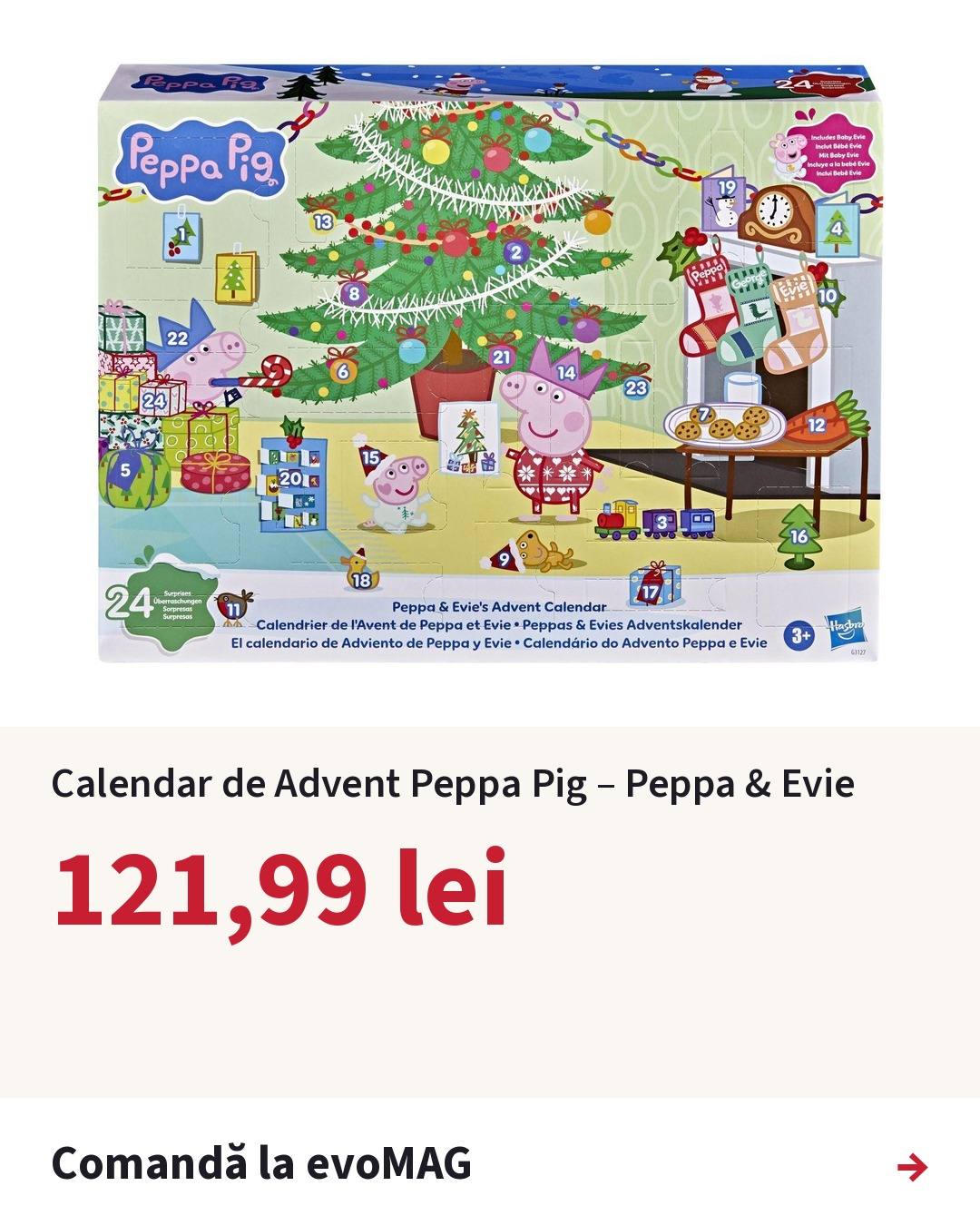
A Facebook ad picture for an advent calendar with no previous price from the shop: only today’s price, 121.99 lei, and “Order at evoMAG”.
A Facebook ad picture for an advent calendar: −33%, 174.98 lei against Atelierul Familiei’s previous price of 263.13 lei, and “Order at Atelierul Familiei”.
Three pictures the tool drew for real campaigns: with a shop’s previous price (left, right) and without one (centre). Product photos belong to the shops.
The ad section of the confirm page: video ad switch, the title on the picture, the primary text with the affiliate disclosure, the headline, the display link, then budget, optimisation and dates.
Texts, budget and dates on the confirm page. Every field can be changed; Preview redraws the picture and checks the edits again.

Video ads generated from a storyboard

A product can also get a video ad: motion graphics over the shop’s photos, rendered frame by frame with Pillow and encoded with FFmpeg. A storyboard, written by a person or an AI agent from what the shop’s page says, lists scenes such as advent doors opening on a photo, a product card with a sticker, callouts pointing at what is in the box, and a calendar leaf counting days.

The last scene is never written in the storyboard: the price, the shop’s previous price and “Order at <shop>” are taken from the offer a campaign would use right now. A video that quotes another price or shop than the current offer is refused on the confirm page. The same storyboard renders at 1080×1920 for Reels, Stories and TikTok, with the text kept out of the areas those apps cover with captions and buttons.

Facebook video ad generated from a storyboard: Gabby’s Dollhouse advent calendar

0:21 · The video loads only when you press play.

Rendered by the ad tool (Pillow frames, FFmpeg) from a storyboard and the shop’s product photos, then used for campaign rfa7. Music-box “Jingle Bells” (1857, public domain) generated in code. No generative-AI footage, no voice.

Read the transcript
  1. [Music: a music-box “Jingle Bells”, no voice] Gabby’s Dollhouse advent calendar. 24 doors, 24 surprises!
  2. Gabby’s Dollhouse Fairylandia advent calendar. 24 surprises.
  3. A new surprise every day! [A calendar leaf counts the days to 24 December.]
  4. What’s behind the doors? Small figures and accessories to mix and match: figures, flowers, a tea set, stickers.
  5. And the box plays too: a pop-up set, a backdrop for the holiday scene.
  6. Play, not chocolate: joy that lasts past Christmas.
  7. Gabby’s Dollhouse Fairylandia – Advent calendar. −33%: 174.98 lei, down from 263.13 lei. The previous price is the one shown by Atelierul Familiei. Order at Atelierul Familiei.

The same storyboard as a 9:16 Reel, Story and TikTok

0:21 · The video loads only when you press play.

Rendered by the same code with one switch (--vertical). Not an ad: nothing is sent to Meta. Public-domain tune generated in code.

Read the transcript
  1. [Music: a music-box “Jingle Bells”, no voice] Gabby’s Dollhouse advent calendar. 24 doors, 24 surprises!
  2. Gabby’s Dollhouse Fairylandia advent calendar. 24 surprises.
  3. A new surprise every day! [A calendar leaf counts the days to 24 December.]
  4. What’s behind the doors? Small figures and accessories to mix and match: figures, flowers, a tea set, stickers.
  5. And the box plays too: a pop-up set, a backdrop for the holiday scene.
  6. Play, not chocolate: joy that lasts past Christmas.
  7. Gabby’s Dollhouse Fairylandia – Advent calendar. −33%: 174.98 lei, down from 263.13 lei. The previous price is the one shown by Atelierul Familiei. Price seen on 11 November 2026. Price and stock may change. Order at Atelierul Familiei.

Audience targeting from the product’s age range

For children’s products the audience starts from the age the shop states, such as “3-5”, “6+” or “0-12 months”. The owner’s working hypothesis, labelled as one on the page: mothers who shop online had their child at 25 to 40, so for a child of X years the ad targets women aged 25+X to 40+X. Meta’s parent groups are chosen by months, not rounded years, so for a 0-6 month toy the tool asks only for parents of babies.

Parents and interests are requested as separate blocks, so the tool never asks for people by an interest alone. Cities each have their own radius (Bucharest 40 km, others 20 km) and Advantage+ audience is off, so age, gender and cities are sent as limits. Meta still treats parent groups and interests as a suggestion: for landing-page-view and link-click optimisation it may widen detailed targeting, so they guide delivery rather than close it. The confirm page says so in one sentence, and the live ad sets’ settings have not been checked against this.

The audience section: women’s age range, gender, radius, cities with their own radius, Meta parent groups by the child’s age, interests and language, with a plain sentence saying how Meta will combine them.
The audience section: ages, gender, radius, cities, Meta parent groups and interests, with the plain-language summary of how Meta combines them.

How the tool limits its Meta Marketing API use

Meta once restricted the owner’s Page posting. Whatever the cause, the tool keeps its own footprint small and stops when Meta objects. No setting can guarantee an account is never restricted; these are the controls in place:

  • Few requests: Meta is called only when a live campaign is created: five requests for a picture ad with the city, interest, parent-group and language ids cached, around fifteen the first time. A video ad adds the upload and then asks whether Meta has finished processing it, every 5 seconds and at most 12 times; the two video campaigns so far took nine requests each. No other repeated checks, nothing “just to see”, no retries.
  • Usage headers read on every answer: past 90% of any quota, or while Meta gives a time to come back, nothing more is sent and live runs pause until then, by themselves.
  • Errors sorted by what a person must do: a rate limit pauses; an expired token, a missing permission or a block stops every live run until a person clears it.
  • Clean failures: if Meta refuses any step, the campaign started in that run is deleted, so nothing half-made stays in Ads Manager. If the delete fails too, the page names the campaign and links to it.
  • Paused by default: campaigns are created paused and switched on after a look in Ads Manager. Each refusal keeps Meta’s fbtrace_id for support.
  • Shop permissions respected: each 2Performant programme’s answer for ten traffic sources is recorded with the date checked; only shops that accept Facebook ads can be advertised.
Meta Ads Manager listing the four campaigns the tool created, each named after the shop, the product and its campaign number (rfa3 to rfa7), all switched off; the account ID and every spend and result figure are blurred.
The campaigns the tool created, as Meta Ads Manager lists them: named after the shop, the product and the campaign number, all switched off after the tests. The account ID and every spend and result figure are blurred.

After launch: campaign history and offer checks

Every campaign leaves a record kept in git: the picture and video that ran, the texts, budget, dates, audience, placements and Meta’s ids, with changes made later in Ads Manager kept beside the creation snapshot. A new campaign for a product advertised in the last 14 days needs an explicit “create anyway”, and an earlier campaign can be used as a starting point for budget, duration and audience.

An offer check reads only our own site and looks for the exact offer the ad advertises: another shop selling the same product cheaper does not make the ad right. It can run every two hours as a user timer and sends a desktop notification only when something changed. It never pauses a campaign itself: a person does, in Ads Manager.

FindingMeaning
OKThe offer is on our page at the ad’s price.
Price higher / lowerThe price differs from the ad’s, compared to the bani.
UnavailableOur page no longer shows that offer: stock, not seen for 3 days, dead link or shop switched off.
Previous price changedThe shop’s previous price, which the ad quotes, is no longer the shop’s.
Stale dataNo import confirmed the offer in 36 hours.
Shop no longer acceptsThe shop’s programme no longer allows Facebook ads.
A campaign’s page after creation: status, product, shop, advertised price against the shop’s previous price, the tracked link (affiliate code masked here), dates, offer check, budget, audience and the ad text.
A campaign’s page in the panel: status, advertised price against the shop’s previous price, the tracked link (affiliate code masked here), dates, last offer check, budget, audience and text.

Who a tool like this is for

  • Online shops with a product feed that advertise single products on Facebook and Instagram and want every ad to state a true price.
  • Affiliate publishers on networks such as 2Performant, Awin, Profitshare, CJ or Amazon Associates who promote merchants’ offers with paid social traffic and must respect each programme’s traffic-source rules.
  • Agencies and marketing teams that build many similar product ads by hand and want the routine done by software while a person keeps the final click.
  • Price comparison and deal sites whose data already says which offers are real.

What we would adapt for your business

  • Your product source: a Shopify, WooCommerce or custom catalogue, a Google Merchant feed, an affiliate feed or a spreadsheet.
  • Your rules for what deserves an ad, written down and shown as ticks and warnings.
  • Picture and video templates in your brand, drawn from verified fields.
  • Campaign objectives other than traffic, catalogue or Advantage+ campaigns, and other channels where their APIs allow it.
  • Reporting: spend, clicks and sales pulled into one place, judged by real profit rather than clicks.

Technology used

  • Python
  • Meta Marketing API (Graph API)
  • httpx
  • Pillow
  • FFmpeg
  • SQLite (read-only over SSH)
  • JSON records in git
  • File locks
  • systemd user timers
  • pytest with a faked Meta
  • 2Performant feeds

The organic side: automatic posts

Paid ads are one half. The same products also reach people through automatic Facebook and Instagram posts made from the night’s real price drops.

What this case study does not claim

This is an internal tool for our own affiliate sites, used for a handful of small test campaigns. We publish no spend, click or sales figures, and we do not claim it makes ads profitable: it makes them faster to build, consistent and honest. Meta decides approvals and delivery; no tool can guarantee an ad account is never restricted.

Questions about Facebook ads automation

Can Facebook and Instagram ads be created automatically through the API?

Yes. The Meta Marketing API can create campaigns, ad sets, creatives and ads, upload images and videos, and set targeting. This tool does all of that in one run, after a person has reviewed everything on a confirm page.

How is this different from Meta’s Advantage+ catalogue ads?

Catalogue ads let Meta choose products and assemble the creative. This tool is the opposite: a person chooses one product, the claim is checked against your own data, and Meta’s automatic enhancements are switched off, so the price and the wording stay exactly as approved.

Will automating ads get my ad account restricted?

No setting can promise that; Meta decides. What software can do is behave like a careful person: few, bounded requests, campaigns created paused, respect for Meta’s usage headers, and a full stop on any block until a human looks.

Can affiliate links be advertised on Facebook?

Only where the merchant’s affiliate programme accepts Facebook ads as a traffic source, and with clear disclosure. The tool records each programme’s answer and refuses shops that decline or have not been checked.

Does it use AI to write the ads?

The ad texts and pictures are filled from verified data by templates, so they never state a price the data does not support. A video storyboard can be drafted by an AI agent from the shop’s own description, and a person approves it before rendering.

Can you build this for my shop or agency?

Yes. We adapt the product source, the rules, the templates and the campaign settings to your business. Start with a short message describing what you advertise and where your product data lives.

Services this project demonstrates

Want your product ads built by software you control?

Tell us what you sell and where your product data lives. We reply personally and say honestly whether automation will pay off.

Discuss your project